Best UGC Video Software for Google Ads
Soldy Team·July 20, 2026·6 min read
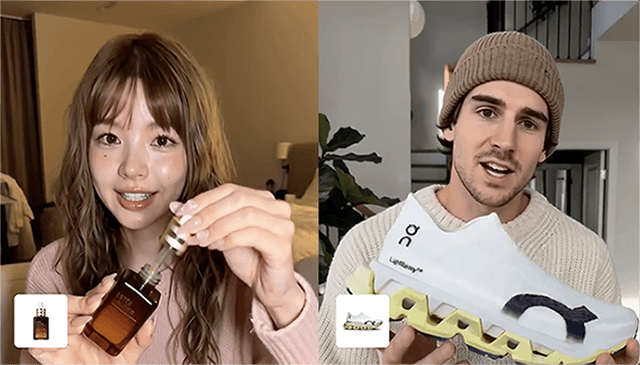
Google Ads is not just another place to run a social video. A viewer on YouTube, a shopper near a product surface, and a search-intent audience all read creative differently.
UGC video software for Google Ads is software that helps teams create creator-style or product-led video assets for Google placements such as YouTube, Demand Gen, and retail-oriented campaigns. The best software keeps the ad clear enough for intent-driven buyers while still borrowing the trust and speed of UGC formats.
Why Google Needs a Separate UGC Workflow
Meta creative often begins with interruption: stop the scroll, create curiosity, then explain. Google creative often begins closer to intent: the viewer may already be researching, comparing, or watching related content.
That changes the first seconds of the ad. A vague lifestyle hook may work in a feed but feel slow in a YouTube or retail context. A Google UGC ad should answer three questions quickly:
- What is the product?
- Why should this buyer care now?
- What proof supports the claim?
Think of Google Ads like a shopper holding a list. You can still be friendly, but you should not make them guess which aisle they are in.
Google-Specific Requirements to Check
Google's official Ads documentation includes video campaigns, Demand Gen campaigns, and retail/product-feed workflows. The practical lesson for UGC production is that creative, product information, and destination quality need to align.
Use this checklist before choosing software:
| Requirement | Why it matters |
|---|---|
| YouTube pacing | The first seconds need a clear reason to keep watching |
| Product-feed alignment | The ad should match the product or offer after the click |
| Aspect ratio coverage | Teams may need horizontal, vertical, and square assets |
| Runtime control | Different placements and tests need different lengths |
| Brand safety | Claims and visuals need review before paid distribution |
| Product proof | Intent-driven viewers need evidence, not just mood |
This is where some UGC tools fall short. They make something that looks like social content, but it does not answer the buyer's active question.
Real Tools to Compare for Google Ads
| Tool | Best Google Ads use case | Why it fits | Caution |
|---|---|---|---|
| Creatify | Product-to-video ad variants | Useful for turning product inputs into ad concepts quickly | Review claims and product accuracy |
| Soldy Marketing Studio | Product-led UGC and commercial video variants | Keeps product assets, mode, avatar, and commercial structure connected | Requires clear product brief |
| HeyGen | Presenter-led explainers and localized video | Useful for YouTube explainers and multilingual markets | May need extra product visuals |
| Arcads | AI actor talking-head hooks | Useful for testing spokesperson-style UGC | Product proof must be added deliberately |
| InVideo AI | Prompt/script-to-video drafts | Useful for broad YouTube ad concepts | Less specialized for commerce testing |
| Captions | Short-form editing and AI ad creative | Useful for quick vertical cuts and creator-style assets | Needs strategic direction |
| VEED | Editing, subtitles, and avatar-assisted video | Useful for repurposing and accessibility versions | Not a full ad strategy workflow |
| Predis.ai | Ecommerce social/ad creative | Useful for product-based creative systems | Confirm fit for Google-specific exports |
For Google Ads, prioritize tools that can keep the product concrete. A pure talking-head ad may be enough for a SaaS explainer, but ecommerce usually needs product shots, use cases, or before-and-after proof.
Match the Tool to the Placement
YouTube ads
YouTube can support a little more story, but the opening still needs to land fast. HeyGen, Arcads, and Synthesia-style avatar workflows can work for founder, expert, or explainer formats. Product-led tools are better when the item itself needs to be shown.
Demand Gen campaigns
Demand Gen creative often needs visual variety and channel-native formats. Tools like Creatify, Captions, InVideo AI, and Soldy can help produce multiple visual versions, but the team should still keep the same hypothesis across variants.
Retail and product-feed contexts
When product data is part of the campaign, vague UGC becomes risky. The ad should look and sound like the product page it leads to. Product-led tools are usually more relevant than avatar-only tools here.
How to Write a Google-Friendly UGC Brief
A Google UGC brief should be tighter than a TikTok-style creative prompt. Include:
- product name and category
- audience intent
- one claim to prove
- proof shot or demonstration
- placement target
- CTA and destination page
- banned claims or compliance notes
This is like giving a director a shot list instead of saying "make it cool." AI video tools respond better when the commercial job is precise.
Where Soldy Fits for Google Ads
Soldy Marketing Studio is relevant when the team wants a product-led video ad workflow with UGC modes and avatar options. The public Marketing Studio page describes product photos, avatars, modes, and 15-second commercial video generation. For Google Ads, that matters because the ad cannot drift too far from the product or destination.
Use Soldy when the product needs to stay central and the team wants controlled ad variants. Use avatar-first tools when the presenter message is the main asset. Use broad editors when the team already has footage or a script and needs versioning.
Google Ads Fit Checklist
Placement
Do not make one generic UGC ad for all Google surfaces. YouTube, Demand Gen, and retail contexts behave differently.
Buyer intent
Write what the buyer already believes or wants before the ad appears.
Product proof
Pick one proof moment: demo, comparison, testimonial, problem/solution, or result.
Placement-specific cuts
Create aspect ratio and runtime variants only after the core message is stable.
Destination match
The ad and landing page should make the same promise.
FAQ
What is the best UGC video software for Google Ads?
For product-led Google Ads, compare Soldy Marketing Studio, Creatify, Predis.ai, and Pippit-style ecommerce tools. For presenter-led YouTube explainers, compare HeyGen, Arcads, Synthesia, and VEED.
Can UGC videos work on YouTube ads?
Yes, but they need a clearer opening than many social feed ads. The viewer should understand the product, claim, and reason to keep watching within the first few seconds.
Do Google Ads need product feeds for UGC video?
Not always. Product feeds matter more for retail and commerce-oriented campaign types. Even without feeds, the video should still match the product and destination page.
Should I use AI avatars for Google Ads?
Use avatars when explanation, trust, or localization matters. Use product-first video when the buyer needs to see the item, result, or use case.
What official Google guidance matters here?
Google Ads documentation around video campaigns, Demand Gen, and product feeds reinforces the same practical requirement: creative assets should match campaign goals, product information, and destinations.
Conclusion
Google UGC creative should feel human without becoming vague. Choose software based on placement and proof, then keep the product close to the ad. For product-led variants, start with Soldy Marketing Studio.
Ready to Create with Marketing Studio?
Drop a link, photo, or PDF — get a cinematic video ad in minutes.
Generate My First Ad